
My computers all run Windows 10. That OS reached end of life in October 2025, and though Microsoft have continued to support their massive user base for now, the end is nigh. For many users, upgrade to Windows 11 is either not possible due to hardware restrictions, or undesirable due to <insert any number of reasons, the list is very long>. So. What is an average computer user to do?
I want to preface this post by saying that my solution might not be one that works for you. I have 30 years of I.T. consultancy under my belt creating solutions for companies. I built my own 30-computer gaming centre and Internet cafe. I run training platforms, servers, web sites and e-commerce. I create custom software stacks for corporations. Technology, learning curves, solving problems in real time, are no barriers for me. I think this is an excellent solution for me and anyone with a modicum of technical ability. This solution may be a nightmare for you. You decide.
At the same time, ask yourself if you should trust your computing future to any post you read online written by a stranger? 100% absolutely no! Make your own decisions, you are a grown up. With those cautionary words in mind, read on to discover whether to follow me down this rabbit hole.
Linux
I went Linux. I have been talking vaguely about dual booting Windows / Linux on my aging laptop for some time. Partly because I wanted to try it, partly because of the upcoming EOL for Windows 10. There are some problems with dual-boot systems. Not least of which, having two operating systems on the same drive takes twice the space, which halves the available disk space for software and documents. I was hesitant to bite the bullet until my equally tech talented wife bought me an m.2 hard drive for Christmas. She reasoned, correctly, that I could simply remove the existing laptop drive and mothball it along with everything on it, in case it was ever needed again. A safe backup. She knows me so well. This was a perfect gift. The new drive would be a clean slate, removing dual-boot issues and giving me maximum freedom to play. I was a kid in a candy store.
Linux OS comes in a bewildering variety of flavours. For <my reasons> I went with the Linux Mint, Cinnamon variety. This OS offers a Windows like experience with minimal command line knowledge requirement. In fact, a week later I have only needed the command line once. As mentioned earlier, I run servers, mainly Linux, so the command line holds no fear for me. But for ease of use, a point and click experience is just easier for everyone. This implementation does the job perfectly. Almost Windows. But good.
How much tech detail do you want here? Prior to removing the Windows hard drive, I used the laptop to download a USB boot disk creator from Rufus (https://rufus.ie/en/). This small exectuable file lets you boot from a pre-prepared installation disk. Download your installation media (in my case, https://linuxmint.com/download.php) in advance. Then run Rufus, point it at your installation file, and then your USB flash drive. It will format that drive and create a bootable USB, ready to roll. It took a few minutes to create. Then I just had to change the hard drive.
Opening the laptop (gulp) revealed the Windows 10 boot hard drive. Removing that and filing it somewhere safe, I replaced it with the new blank hard drive. I left the laptop open, reasoning there was no point refastening all those screws only to unfasten them again if it didn’t work. Drive installed, I inserted the USB drive and rebooted. The new hard drive was still blank, so the system correctly identified no bootable hard drive and went to the USB to boot (BIOS changes may be required). The boot menu menu came up. ‘Install’, please. A few prompts and the deed was done. Remove the USB. Reboot. And up came my shiny new Linux Mint install. Total time from Rufus and Linux download, including screwdriver work? 20 minutes.
With a quick review of the new environment I was able to determine that everything I needed right here and now was in place. Including Libre Office, a Microsoft office alternative software suite which is:
- Fully compatible, will open 99% of Office docs and let you save to Office formats
- Already installed by the Linux USB boot disk, it’s part of the installation
- Entirely free. Open source all the way
Software
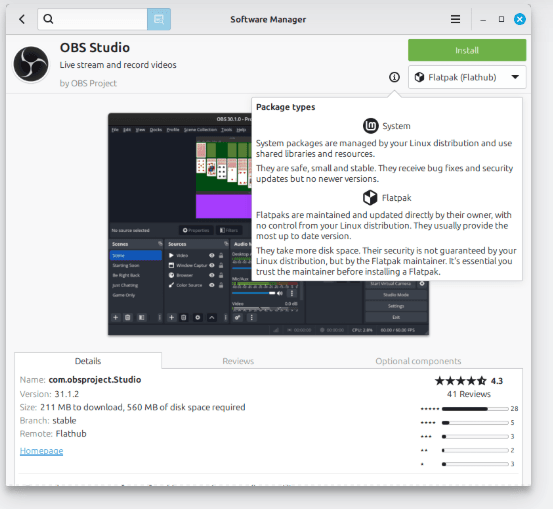
I have a very specific set of requirements which again may not mirror yours. As a graphic designer and photographer I want a portable workstation I can use in the car. Some of the software I currently use every day is simply not available on Linux. Period. That can be a deal breaker. You should definitely research that ahead of time if considering going down this road. I had researched it, and found alternatives that would achieve what I need. Not identical. Not as simple. Often, though, better. A different workflow, but I take that in stride. For creatures of habit that learning curve may be problematic. The differences between Windows and Linux often come down to the lowest common denominator: You. Broadly speaking Windows tends to follow the KISS principle, whereas Linux treats you like a grown up, and that means it demands more from you. The real bonus here? 100% free. Not only the OS but the software itself.
Photo editing suites, video production and graphic design packages, MS Office replacements, and more. Available. Free. And quickly installed using the handy dandy software installation manager. Within a few minutes of restarting under the new Linux Mint OS I had everything I wanted. Minutes. And did I mention, all of this is 100% free? There are some downsides. Loss of certain functionality. It’s a trade off. Lose some features but gain others. And some of the ones gained outweigh the losses. But I’m not going to great detail in the differences here, it would take far too long.
Hardware
The biggest single possible cause for concern is your hardware. I did my research before starting, which apart from being good practice <almost> guarantees a 20 minute installation without issues. The install detected my touch pad. My touch screen display. My USB ports. My SD card reader. Everything just worked. The installer identified all components and installed generic drivers. The update manager pulled any required drivers from the Internet automatically after I connected the laptop to my wireless network, another completely painless process.
Now, there is no way dear reader that I can possibly guess the configuration of your system. I cannot therefore guarantee a painless Linux install. Mine went painlessly because I did the research.
Some devices don’t work well under Linux. Some nVidia graphics cards, some CPU’s are notable examples. This being the case, I once more encourage research before upgrade. It doesn’t take much. The Linux Mint web site has copious documentation. One of the pros (and cons) of the Open Source system is that they will tell you how it is in plain language. “This won’t work”. But the skilled coders in the community are just as likely to write what you need so that it will, if you ask nicely in the right forums. Got a 20 year old vinyl cutter that you can’t find drivers for? They will write one. For free. Try doing that with Windows.
In my case, too, I was installing to a blank drive. If it didn’t work I could just put the old one back. Nothing lost. But if you wiped your only drive to do this, you could be in a bad place right now. So don’t.
Caveat Emptor
Buyer beware. Much software is available under both Windows and Linux. Some is not. I use the Adobe Creative Suite. That has no space in the Linux world. Doesn’t work. Period. That is a heavy blow. The new Affinity suite can be made to work, as can Davinci Resolve. Kinda. Both are kludges involving workarounds that might break with the next update. My take? They can’t be relied upon for production environments. Imagine them going down while you have a client yelling in your ear about deadlines. So I am trialling alternatives and just enjoying playing in my new playground. So far I have not encountered any deal breakers. Different workflows, sure. But nothing that stops the train. I have no fears. And neither should you.
Takeaways
The takeaways here should be that there are no reasons to fear that your Windows 10 computer will just stop working. It won’t. Yet. There is also no reason to buy expensive hardware upgrades just to remain at the mercy of the Microsoft machine. And finally, no reason to tie yourself to a setup that charges you for the operating system you use while charging you for the software you use, while selling your personal details and having the sheer nerve to harvest your usage and browsing habits to throw adverts at you while you work. Honestly, Microsoft, you went too far this time. Hence my experiment with Linux.
Sidebar, look it up: A large part of the French government just went Linux. They moved over 50,000 employees to the same environment to which I moved. Saving an estimated 152 million Euros just in annual subscriptions to MS Office. This is the tip of the iceberg. Linux has doubled its global market share in both government and corporate arenas in 6 months, and stats for home computer installs indicate Joe Public is riding that same wave. Mark my words, the dominos are falling.
Bottom Line
One week in and Im really liking it. My laptop is faster. The OS takes up less space while offering more. My city had a power outage this weekend. I used my new Linux-powered laptop for the duration. I know from experience that with Windows 10 the best I could hope for is around 3.5 hours before the battery gave out. 4 hours in, I went to bed with 52% battery life remaining. Suck it, Microsoft.
Software is readily available for free install with a click. It took 20 minutes to install the OS and another 20 to install all the apps (and there were a lot) I wanted using the built-in software package manager. Point-click-install. The only real downside is that some of the software packages we like to use are not available for Linux. And that hurts. But maybe that is part of a deeper migration from those subscription models we all hate. This will be an ongoing project. I for one am tired of having my wallet harvested every month. As I hope this post has demonstrated, there are many ways to achieve a goal. And learning how to do that is part of the fun. Take off the training wheels. And ride that bike. Onward!